
Mitsubishi Keyless Entry Remotes
Shop standalone Mitsubishi keyless-entry remotes at Noble Key Supply. This collection includes two- and three-button aftermarket replacement remotes for compatible Mitsubishi vehicles.
These handheld transmitters control supported keyless-entry functions separately from the vehicle’s mechanical or transponder key. Available remotes use FCC ID OUCG8D-525M-A and operate at 315 MHz, but compatibility must still be verified by vehicle, part number, and button layout.
Standalone Remotes for Mitsubishi Vehicles
A standalone Mitsubishi remote is a separate keyless-entry transmitter without an attached mechanical blade. It is intended for vehicles that use an independent remote alongside a standard metal or transponder key.
Depending on the application, the remote may control:
- Door locking
- Door unlocking
- Panic alarm
- Other supported factory keyless-entry functions
The remote does not replace the key used in the ignition. If the vehicle uses a transponder-based immobilizer, a correctly cut and programmed key is still required to start the engine.
Mitsubishi Remotes vs. Mitsubishi Remote Keys
Standalone remotes and remote keys are different products. Identifying the original style before ordering helps prevent compatibility problems.
A standalone Mitsubishi remote:
- Does not have an attached key blade
- Controls keyless-entry functions
- Is carried separately from the ignition key
- Does not typically contain the ignition transponder
- Does not start the vehicle
A Mitsubishi remote key:
- Combines a key blade and remote housing
- May contain an immobilizer transponder
- Requires key cutting
- May require both immobilizer and remote programming
- Can operate the ignition when properly prepared
If the original key has buttons built into its head, select a Mitsubishi remote key rather than a standalone remote.
Two-Button Mitsubishi Remotes
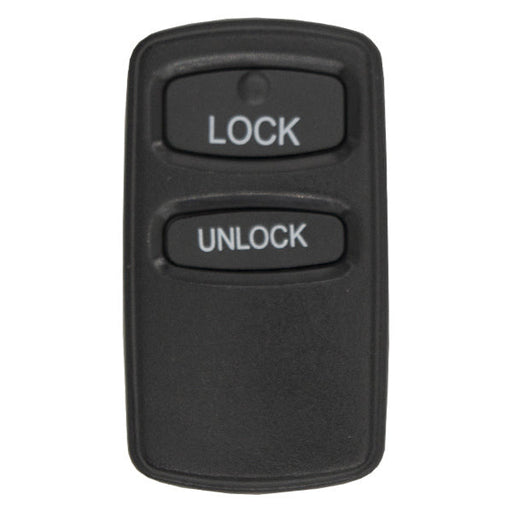
Two-button Mitsubishi remotes generally provide lock and unlock controls. They are a practical replacement for vehicles originally equipped with the same two-button transmitter.
The collection includes an aftermarket replacement associated with part number MR587983. Its listed specifications include:
- FCC ID: OUCG8D-525M-A
- Frequency: 315 MHz
- Buttons: Lock and unlock
- Battery: CR2032
- Replacement part number: MR587983
Match all specifications with the original remote. A two-button configuration should not be substituted solely because another remote uses the same case shape.
Three-Button Mitsubishi Remotes
Three-button Mitsubishi remotes add another function to the standard lock and unlock controls. Depending on the supported vehicle, the additional button may operate the panic alarm or another factory keyless-entry feature.
The collection includes a Mitsubishi three-button remote associated with part number MR587982 and FCC ID OUCG8D-525M-A.
Before ordering, compare:
- Button count
- Button icons
- FCC ID
- Manufacturer part number
- Frequency
- Housing design
- Vehicle application
A three-button remote will not automatically add a feature to a vehicle originally equipped with a two-button system.
Match FCC ID OUCG8D-525M-A
The FCC ID identifies the remote transmitter design and is one of the most important compatibility references. The Mitsubishi remotes in this collection use FCC ID OUCG8D-525M-A.
Compare the entire FCC ID printed on the original remote. A similar identification number may represent a different transmitter, circuit board, frequency, or vehicle application.
The FCC ID may be located:
- On the rear of the remote
- Inside the battery compartment
- On a label within the housing
- In the original remote’s documentation
If the label is missing or illegible, use the vehicle information and manufacturer part number to confirm the correct replacement.
MR587982 and MR587983 Remotes
The manufacturer part number helps distinguish between the two available Mitsubishi remote configurations.
Part numbers represented in this collection include:
- MR587982 for a compatible three-button remote
- MR587983 for a compatible two-button remote
The final digits differ by only one number, making it particularly important to verify the full part number. Use it together with the FCC ID and button layout.
315 MHz Mitsubishi Remotes
These Mitsubishi replacement remotes operate at 315 MHz. Frequency determines how the transmitter communicates with the vehicle’s keyless-entry receiver.
A remote operating at the wrong frequency will not communicate correctly with the vehicle, even when its buttons and housing look identical.
Do not select a replacement based only on appearance. Confirm:
- FCC ID
- Frequency
- Part number
- Button configuration
- Vehicle year and model
All five details should correspond with the required application.
Aftermarket Mitsubishi Remotes
The collection includes aftermarket replacements for supported Mitsubishi keyless-entry systems. Aftermarket remotes provide a cost-effective alternative when the original transmitter is lost, damaged, or no longer working.
A compatible aftermarket remote is designed to provide the specified keyless-entry functions after successful programming. Confirm what is included with the product, including the battery and any programming instructions.
Aftermarket status does not make the remote universal. It must still match the vehicle’s original electronic specifications.
CR2032 Remote Batteries
The listed two-button Mitsubishi remote uses a CR2032 lithium coin-cell battery. Confirm the required battery for the selected product before installation.
Symptoms of a weak remote battery may include:
- Reduced operating range
- Intermittent lock or unlock response
- Buttons requiring multiple presses
- A remote that stops working completely
Installing a fresh battery may restore an existing remote when the transmitter is otherwise functional. It will not resolve an incompatible FCC ID, damaged circuit board, or lost vehicle pairing.
When installing the battery, confirm the positive and negative orientation and avoid damaging the battery contacts.
Programming a Mitsubishi Remote
A replacement remote must be paired with the vehicle before it can operate the locks. The programming method depends on the vehicle’s year, model, body configuration, and keyless-entry system.
Depending on the application, programming may require:
- An onboard procedure
- A specific ignition and door sequence
- Compatible diagnostic equipment
- A professional automotive locksmith
- Reprogramming all remotes during the same session
Some systems erase previously stored remotes when entering programming mode. Have every remote that should continue operating the vehicle available before beginning the procedure.
Remote Programming Is Separate From Key Programming
Programming a standalone remote does not program the ignition key or transponder. These are separate functions.
Remote programming pairs the transmitter with the vehicle’s keyless-entry receiver. Transponder programming authorizes a chipped key to start the engine.
A Mitsubishi vehicle may therefore require:
- Remote programming for lock and unlock functions
- Transponder programming for engine authorization
- Mechanical cutting for the ignition and door locks
Replacing only the remote does not affect the cuts or programming of the existing ignition key.
Replacing a Lost Mitsubishi Remote
If the original remote is lost but the ignition key remains available, a compatible standalone transmitter may restore the factory keyless-entry functions.
Before ordering, use any available records to identify the original FCC ID and part number. Vehicle year and model alone may not be sufficient because manufacturers can use different systems during the same production period.
After programming the replacement, test every button and confirm whether the missing remote remains registered. A locksmith or technician can advise whether old transmitter memory should be cleared for security.
Replacing a Damaged Remote
A replacement remote may be appropriate when the original has:
- Broken or missing buttons
- A cracked housing
- Corroded battery contacts
- Water damage
- A failed circuit board
- Intermittent transmitter operation
- Excessive wear
If the original electronics still function and only the exterior housing is damaged, replacing the remote shell may be another option. When the circuit board has failed, a complete replacement remote is generally required.
Adding a Spare Mitsubishi Remote
Adding a spare remote provides convenient backup access when the primary transmitter is misplaced or damaged. It can also allow multiple drivers to have their own keyless-entry controls.
Verify the spare remote using the same standards as a direct replacement. It should match the FCC ID, frequency, part number family, button layout, and vehicle application.
Program and test the spare before it is needed. Store it with a working ignition key when possible.
Testing the Replacement Remote
After programming, test the remote from several positions around the vehicle. Confirm that each supported button performs the correct function.
A complete test should include:
- Locking all doors
- Unlocking the driver’s door
- Unlocking the remaining doors, if supported
- Activating the panic function, when equipped
- Checking response at a normal operating distance
- Confirming that existing remotes still work
If the replacement does not respond, recheck the battery, FCC ID, frequency, programming procedure, and vehicle application.
How to Choose the Correct Mitsubishi Remote
Before ordering a standalone Mitsubishi remote, verify:
- Vehicle year, make, and model
- Whether the vehicle uses a standalone remote
- FCC ID
- Manufacturer part number
- Operating frequency
- Number of buttons
- Button icons and functions
- Battery type
- Aftermarket replacement compatibility
- Required programming procedure
Checking every available identifier helps avoid ordering a remote that looks correct but cannot communicate with the vehicle.
Shop Mitsubishi Remotes at Noble Key Supply
Browse two- and three-button aftermarket Mitsubishi remotes for compatible factory keyless-entry systems. Available replacements include 315 MHz remotes using FCC ID OUCG8D-525M-A and part numbers MR587982 and MR587983.
Compare the FCC ID, manufacturer part number, button layout, and vehicle information to choose the correct Mitsubishi keyless-entry remote.

Original price
$0.00
-
Original price
$0.00
Original price
$0.00
$22.99
$22.99
-
$22.99
Current price
$22.99
R-MIT-983
In Stock
Mitsubishi 2-Button Remote MR587983Aftermarket ReplacementFCC ID: OUCG8D-525M-AFrequency: 315 MHzBattery: CR2032Button: Lock, UnlockReplaces PN: MR...
View Full Details
Original price
$0.00
-
Original price
$0.00
Original price
$0.00
$22.99
$22.99
-
$22.99
Current price
$22.99
Shop standalone Mitsubishi keyless-entry remotes at Noble Key Supply. This collection includes two- and three-button aftermarket replacement remotes for compatible Mitsubishi vehicles.
These handheld transmitters control supported keyless-entry functions separately from the vehicle’s mechanical or transponder key. Available remotes use FCC ID OUCG8D-525M-A and operate at 315 MHz, but compatibility must still be verified by vehicle, part number, and button layout.
Standalone Remotes for Mitsubishi Vehicles
A standalone Mitsubishi remote is a separate keyless-entry transmitter without an attached mechanical blade. It is intended for vehicles that use an independent remote alongside a standard metal or transponder key.
Depending on the application, the remote may control:
- Door locking
- Door unlocking
- Panic alarm
- Other supported factory keyless-entry functions
The remote does not replace the key used in the ignition. If the vehicle uses a transponder-based immobilizer, a correctly cut and programmed key is still required to start the engine.
Mitsubishi Remotes vs. Mitsubishi Remote Keys
Standalone remotes and remote keys are different products. Identifying the original style before ordering helps prevent compatibility problems.
A standalone Mitsubishi remote:
- Does not have an attached key blade
- Controls keyless-entry functions
- Is carried separately from the ignition key
- Does not typically contain the ignition transponder
- Does not start the vehicle
A Mitsubishi remote key:
- Combines a key blade and remote housing
- May contain an immobilizer transponder
- Requires key cutting
- May require both immobilizer and remote programming
- Can operate the ignition when properly prepared
If the original key has buttons built into its head, select a Mitsubishi remote key rather than a standalone remote.
Two-Button Mitsubishi Remotes
Two-button Mitsubishi remotes generally provide lock and unlock controls. They are a practical replacement for vehicles originally equipped with the same two-button transmitter.
The collection includes an aftermarket replacement associated with part number MR587983. Its listed specifications include:
- FCC ID: OUCG8D-525M-A
- Frequency: 315 MHz
- Buttons: Lock and unlock
- Battery: CR2032
- Replacement part number: MR587983
Match all specifications with the original remote. A two-button configuration should not be substituted solely because another remote uses the same case shape.
Three-Button Mitsubishi Remotes
Three-button Mitsubishi remotes add another function to the standard lock and unlock controls. Depending on the supported vehicle, the additional button may operate the panic alarm or another factory keyless-entry feature.
The collection includes a Mitsubishi three-button remote associated with part number MR587982 and FCC ID OUCG8D-525M-A.
Before ordering, compare:
- Button count
- Button icons
- FCC ID
- Manufacturer part number
- Frequency
- Housing design
- Vehicle application
A three-button remote will not automatically add a feature to a vehicle originally equipped with a two-button system.
Match FCC ID OUCG8D-525M-A
The FCC ID identifies the remote transmitter design and is one of the most important compatibility references. The Mitsubishi remotes in this collection use FCC ID OUCG8D-525M-A.
Compare the entire FCC ID printed on the original remote. A similar identification number may represent a different transmitter, circuit board, frequency, or vehicle application.
The FCC ID may be located:
- On the rear of the remote
- Inside the battery compartment
- On a label within the housing
- In the original remote’s documentation
If the label is missing or illegible, use the vehicle information and manufacturer part number to confirm the correct replacement.
MR587982 and MR587983 Remotes
The manufacturer part number helps distinguish between the two available Mitsubishi remote configurations.
Part numbers represented in this collection include:
- MR587982 for a compatible three-button remote
- MR587983 for a compatible two-button remote
The final digits differ by only one number, making it particularly important to verify the full part number. Use it together with the FCC ID and button layout.
315 MHz Mitsubishi Remotes
These Mitsubishi replacement remotes operate at 315 MHz. Frequency determines how the transmitter communicates with the vehicle’s keyless-entry receiver.
A remote operating at the wrong frequency will not communicate correctly with the vehicle, even when its buttons and housing look identical.
Do not select a replacement based only on appearance. Confirm:
- FCC ID
- Frequency
- Part number
- Button configuration
- Vehicle year and model
All five details should correspond with the required application.
Aftermarket Mitsubishi Remotes
The collection includes aftermarket replacements for supported Mitsubishi keyless-entry systems. Aftermarket remotes provide a cost-effective alternative when the original transmitter is lost, damaged, or no longer working.
A compatible aftermarket remote is designed to provide the specified keyless-entry functions after successful programming. Confirm what is included with the product, including the battery and any programming instructions.
Aftermarket status does not make the remote universal. It must still match the vehicle’s original electronic specifications.
CR2032 Remote Batteries
The listed two-button Mitsubishi remote uses a CR2032 lithium coin-cell battery. Confirm the required battery for the selected product before installation.
Symptoms of a weak remote battery may include:
- Reduced operating range
- Intermittent lock or unlock response
- Buttons requiring multiple presses
- A remote that stops working completely
Installing a fresh battery may restore an existing remote when the transmitter is otherwise functional. It will not resolve an incompatible FCC ID, damaged circuit board, or lost vehicle pairing.
When installing the battery, confirm the positive and negative orientation and avoid damaging the battery contacts.
Programming a Mitsubishi Remote
A replacement remote must be paired with the vehicle before it can operate the locks. The programming method depends on the vehicle’s year, model, body configuration, and keyless-entry system.
Depending on the application, programming may require:
- An onboard procedure
- A specific ignition and door sequence
- Compatible diagnostic equipment
- A professional automotive locksmith
- Reprogramming all remotes during the same session
Some systems erase previously stored remotes when entering programming mode. Have every remote that should continue operating the vehicle available before beginning the procedure.
Remote Programming Is Separate From Key Programming
Programming a standalone remote does not program the ignition key or transponder. These are separate functions.
Remote programming pairs the transmitter with the vehicle’s keyless-entry receiver. Transponder programming authorizes a chipped key to start the engine.
A Mitsubishi vehicle may therefore require:
- Remote programming for lock and unlock functions
- Transponder programming for engine authorization
- Mechanical cutting for the ignition and door locks
Replacing only the remote does not affect the cuts or programming of the existing ignition key.
Replacing a Lost Mitsubishi Remote
If the original remote is lost but the ignition key remains available, a compatible standalone transmitter may restore the factory keyless-entry functions.
Before ordering, use any available records to identify the original FCC ID and part number. Vehicle year and model alone may not be sufficient because manufacturers can use different systems during the same production period.
After programming the replacement, test every button and confirm whether the missing remote remains registered. A locksmith or technician can advise whether old transmitter memory should be cleared for security.
Replacing a Damaged Remote
A replacement remote may be appropriate when the original has:
- Broken or missing buttons
- A cracked housing
- Corroded battery contacts
- Water damage
- A failed circuit board
- Intermittent transmitter operation
- Excessive wear
If the original electronics still function and only the exterior housing is damaged, replacing the remote shell may be another option. When the circuit board has failed, a complete replacement remote is generally required.
Adding a Spare Mitsubishi Remote
Adding a spare remote provides convenient backup access when the primary transmitter is misplaced or damaged. It can also allow multiple drivers to have their own keyless-entry controls.
Verify the spare remote using the same standards as a direct replacement. It should match the FCC ID, frequency, part number family, button layout, and vehicle application.
Program and test the spare before it is needed. Store it with a working ignition key when possible.
Testing the Replacement Remote
After programming, test the remote from several positions around the vehicle. Confirm that each supported button performs the correct function.
A complete test should include:
- Locking all doors
- Unlocking the driver’s door
- Unlocking the remaining doors, if supported
- Activating the panic function, when equipped
- Checking response at a normal operating distance
- Confirming that existing remotes still work
If the replacement does not respond, recheck the battery, FCC ID, frequency, programming procedure, and vehicle application.
How to Choose the Correct Mitsubishi Remote
Before ordering a standalone Mitsubishi remote, verify:
- Vehicle year, make, and model
- Whether the vehicle uses a standalone remote
- FCC ID
- Manufacturer part number
- Operating frequency
- Number of buttons
- Button icons and functions
- Battery type
- Aftermarket replacement compatibility
- Required programming procedure
Checking every available identifier helps avoid ordering a remote that looks correct but cannot communicate with the vehicle.
Shop Mitsubishi Remotes at Noble Key Supply
Browse two- and three-button aftermarket Mitsubishi remotes for compatible factory keyless-entry systems. Available replacements include 315 MHz remotes using FCC ID OUCG8D-525M-A and part numbers MR587982 and MR587983.
Compare the FCC ID, manufacturer part number, button layout, and vehicle information to choose the correct Mitsubishi keyless-entry remote.